
The platters store the data. Nothing else does.
The platters are rigid disks, usually an aluminum or glass substrate coated with a thin magnetic film. Your data exists as the magnetic orientation of microscopic regions on that film, organized into concentric tracks and sectors. A modern drive packs terabytes onto two or three platters, which means even a coin-sized fragment of a platter surface can hold millions of records.
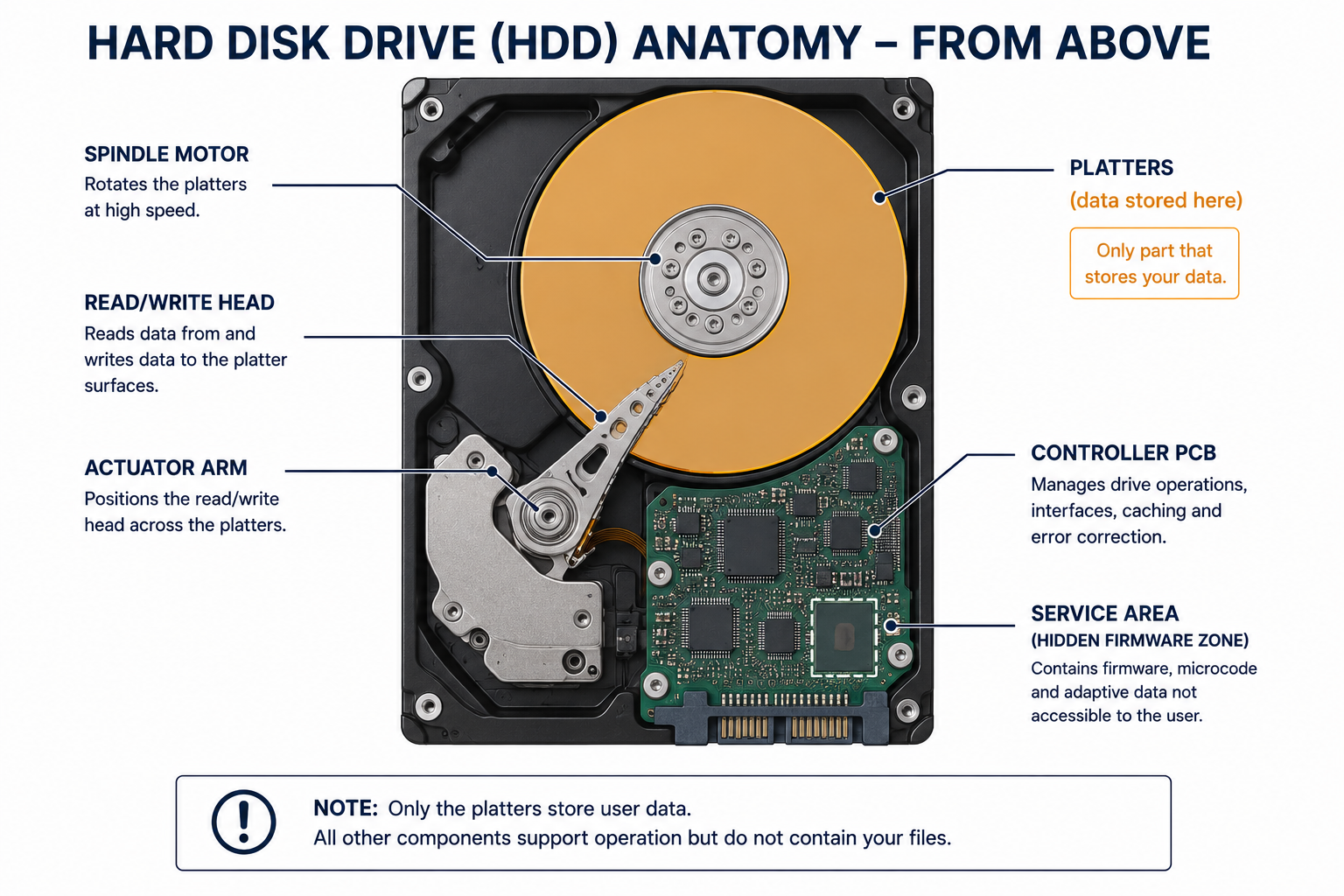
Two properties of the platter drive every sanitization choice. First, the data persists as a physical magnetic state, so it survives loss of power, loss of the file system, and loss of the drive’s ability to spin. Second, the magnetic film has a measurable coercivity, the field strength required to flip its orientation. Coercivity is why degaussing works and why the degausser has to be strong enough for the specific media. The platter gives up its data in only two ways: the magnetic orientation is randomized (a Purge, by degaussing), or the substrate itself is reduced to fragments too small to reconstruct (Destroy).
Read/write heads and the actuator move, they do not store
The read/write heads fly a few nanometers above each platter surface on a cushion of air, and the actuator arm swings them to the right track. These components are how the drive accesses data. They hold none of it.
This distinction is where the most expensive mistakes happen. A drive that will not spin up, clicks, or has seized bearings is a drive with a dead access mechanism, not a sanitized drive. The platters inside are intact and fully readable in a recovery lab, which can move the platters into a donor chassis or replace the heads. Treating a non-functional drive as if the data is gone is a documented cause of breach exposure during decommissioning. A dead drive still needs a real sanitization method applied to the platters.
The service area is the hidden region overwrite tools can miss
Every drive reserves a firmware zone, variously called the service area, system area, or negative cylinders, that the operating system never sees. It stores firmware modules, adaptive tuning parameters, SMART logs, and the drive’s defect lists: the P-list of factory defects and the G-list of sectors reallocated during use.
Two mechanisms in this region defeat naive wiping. When a sector goes bad, the drive remaps it to a spare and adds it to the G-list, but the original sector can still hold readable data that a normal overwrite pass never reaches because the drive no longer addresses it. Separately, a Host Protected Area (HPA) and a Device Configuration Overlay (DCO) can hide ranges of sectors from the host entirely. An overwrite tool that respects HPA and DCO, or that ignores reallocated sectors, reports success while leaving data behind. This is precisely why NIST defines the Clear method as overwriting the entire addressable space and requires resetting HPA and DCO first, and why a firmware-level Purge (the drive’s own secure-erase command) is more thorough than a host-side overwrite for these hidden regions.
The controller board translates, and holds a little state of its own
The printed circuit board carries the controller chip, a cache of volatile DRAM, and a small serial flash chip. The cache is volatile and holds nothing after power loss, so it is not a persistence concern. The serial flash, however, stores drive-specific adaptive data on many modern drives, which is why simply swapping a healthy PCB onto a dead drive often fails: the adaptives do not match. Recovery specialists transplant the ROM contents for this reason. The board itself is not where your files live, but it is part of why platter data stays recoverable even when the electronics are damaged.
Why deletion, formatting, and casual damage all leave data intact
Deleting a file removes its pointer from the file system and marks the space as available. Formatting rebuilds the index. In both cases the magnetic patterns on the platters are untouched, which is why recovery software reconstructs deleted files routinely. In NIST terms, neither operation even reaches the Clear threshold.
Physical abuse is only as good as its coverage of the platter surface. Drilling a hole or bending the chassis damages a fraction of the platter and leaves the rest readable. Snapping a drive in half can leave large intact platter regions. The reason professional destruction specifies a particle size, rather than “break it,” is that recoverability is a function of how much continuous platter surface survives.
Component-to-sanitization map
The anatomy translates directly into what a valid method has to accomplish.
| Component | Holds recoverable data? | Implication for sanitization |
|---|---|---|
| Platters | Yes, all of it | Must be overwritten (Clear), magnetically randomized (Purge by degauss), or physically destroyed |
| Read/write heads, actuator | No | Damaging them disables the drive but sanitizes nothing |
| Service area, G-list sectors, HPA/DCO | Yes, in hidden or remapped regions | Overwrite must cover full addressable space and reset HPA/DCO; firmware Purge reaches these regions |
| Controller PCB (serial flash) | Adaptive data, not user files | Relevant to recovery, not a primary sanitization target |
| Cache DRAM | No, volatile | No action needed |
Choosing the method the anatomy demands
The federal Guidelines for Media Sanitization in NIST SP 800-88 Rev. 2 define three categories, and the drive’s anatomy tells you which one fits.
- Clear overwrites the entire addressable space through hard drive data wiping, including resetting HPA and DCO. It defeats non-invasive recovery and leaves a magnetic HDD reusable. It is a valid choice when the drive will be redeployed and the data is not so sensitive that any residual-risk from remapped sectors is unacceptable. Note that overwrite standards such as DoD 5220.22-M map to Clear, not Purge, and are not reliable on flash-based media.
- Purge uses degaussing or the drive’s firmware secure-erase. Degaussing randomizes the platter domains and works on magnetic media only; it has no effect on SSDs or flash. Degaussing also destroys the servo tracks written at the factory, so a degaussed HDD is no longer functional.
- Destroy shreds, disintegrates, or pulverizes the platters to a particle size small enough that no continuous surface remains to reconstruct. This is the method, offered as certified hard drive destruction, that regulated organizations most often pair with a serialized Certificate of Destruction for audit evidence.
A workable decision rule: if the drive is being redeployed internally, Clear or a firmware Purge is usually sufficient. If the drive held regulated data (HIPAA, GLBA, PCI DSS, CJIS, or contractual confidential data) and is leaving your control, Purge or Destroy with a documented chain of custody and a Certificate of Destruction gives you evidence you can show an auditor. This is general guidance, not legal advice; confirm your specific retention and disposal obligations with counsel.
Key points
- The platters are the only part that stores your data; a dead or broken drive is not a sanitized drive.
- Deleting and formatting leave the magnetic data fully intact and are not even a NIST Clear.
- Remapped sectors, HPA, and DCO let hidden data survive a careless overwrite, so a valid Clear must cover the full addressable space and reset those regions.
- Degaussing is a magnetic-only Purge and permanently disables an HDD; it does nothing to SSDs.
- Physical destruction is measured by particle size because recoverability tracks how much platter surface survives.
Data Destruction Inc. handles retired hard drives on the premise this article describes: the data lives on the platters, so every method we apply is chosen for the platters and documented. Our operators are trained, bonded, and background-checked, custody is tracked from pickup through the destruction event under tamper-evident seal, and you receive a serialized Certificate of Destruction provided within 24 hours after the destruction event is complete. Depending on whether your drives are being redeployed or retired, we apply NIST SP 800-88 r2 conformant wiping, degaussing, or shredding. To scope a project, call (866) 850-7977.
FAQ
Does destroying the circuit board erase the data?
No. The circuit board controls access to the platters but stores no user data. Removing or destroying the board makes the drive unreadable with ordinary equipment, but the platters still hold everything and can be read in a recovery lab.
Can data be recovered from a hard drive that will not spin up?
Yes, frequently. A drive that does not spin usually has a failed motor, seized bearings, or damaged heads, none of which touch the data on the platters. A lab can move the platters to a working chassis, so a dead drive still requires a real sanitization method.
Is one pass of overwriting enough for a modern hard drive?
For current drives, a single full overwrite of the entire addressable space meets the NIST Clear standard, provided HPA and DCO are reset first so no region is skipped. The old multi-pass advice predates modern areal densities. Overwriting is not reliable on SSDs or other flash media.
Are solid-state drives sanitized the same way as hard drives?
No. An SSD has no platters. It stores data as electrical charge in NAND flash, and its controller spreads writes across spare cells using wear leveling and over-provisioning. Degaussing does nothing to flash, and a host-level overwrite cannot reach every cell, so an SSD is sanitized by cryptographic erase when it was encrypted from first write, or by SSD destruction to the required particle size.
Which regulations require documented hard drive destruction?
Several frameworks require that media holding regulated data be sanitized and that the disposal be documented. Common ones include HIPAA media disposal for health data, the GLBA Safeguards Rule for financial data, and PCI DSS media disposal for cardholder data, all of which map to the NIST SP 800-88 methods described above. Regulated sectors such as healthcare and financial services most often require a serialized Certificate of Destruction as the audit record.
—