
How NAND flash stores data
NAND flash stores each bit as a level of electrical charge held in a memory cell, either a floating gate or a charge-trap layer. The cell keeps that charge without power, which is why an SSD retains data on the shelf. How many bits share a cell defines the flash type: SLC holds one bit per cell, MLC two, TLC three, and QLC four. More bits per cell means more capacity per dollar and fewer write cycles of endurance.
The physical organization is what makes flash behave unlike a platter. Cells are grouped into pages, which are the smallest unit that can be written, and pages are grouped into blocks, which are the smallest unit that can be erased. Flash cannot overwrite a page in place. To change data, the drive writes the new version to a fresh, already-erased page and marks the old page stale. The stale page keeps its old contents until the whole block is erased later. Each block also tolerates only a limited number of program and erase cycles before it wears out.
The controller and the flash translation layer
The controller runs a flash translation layer (FTL) that maps the logical block addresses the operating system uses to the physical NAND locations that actually hold the data. Because in-place overwrite is impossible, every logical write becomes a write to a new physical page plus a remap. The prior copy remains in flash until garbage collection erases that block, and garbage collection runs on the controller’s schedule, not yours.
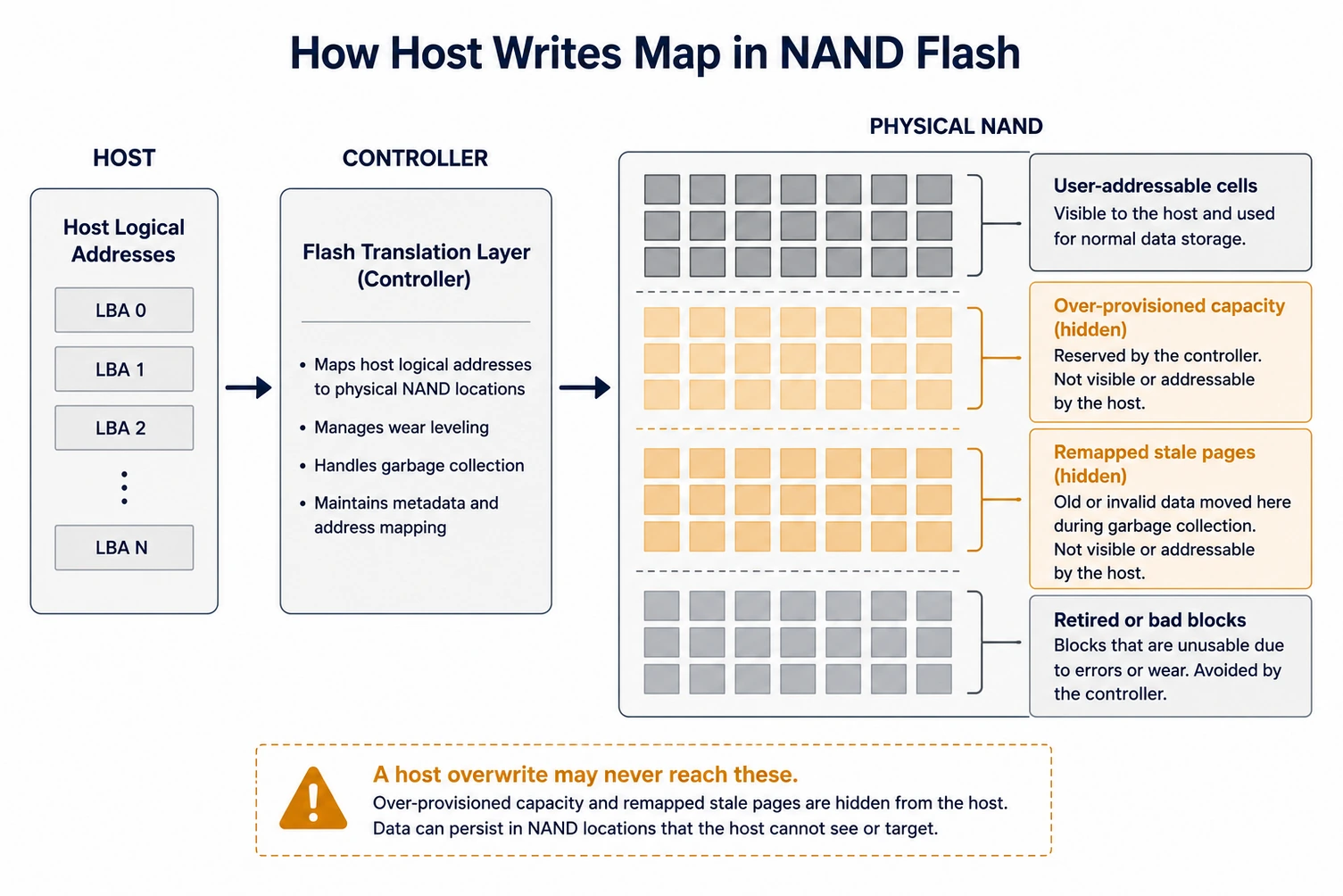
Several controller behaviors compound this. Wear leveling deliberately spreads writes across the whole chip so no block wears out early, which scatters copies of data. Over-provisioning reserves a hidden pool of capacity, commonly 7 to 28 percent, that the host cannot address at all. Bad-block management retires worn or failing blocks, and a retired block can still hold readable data that no host command will ever reach. A DRAM cache holds in-flight data but is volatile, so it is not a persistence concern.
The practical consequence is a single sentence worth internalizing: on an SSD, the host does not control which physical cells hold your data, so a host that thinks it overwrote everything usually did not.
Why overwriting does not reliably sanitize an SSD
A full-span overwrite is the NIST Clear method for a hard drive, and on magnetic media it works because logical addresses map directly to physical sectors. On an SSD the FTL breaks that assumption. The overwrite writes to logical addresses, the controller directs those writes to fresh cells, and the original data lingers in remapped pages, over-provisioned capacity, and retired blocks until nondeterministic garbage collection happens to erase it.
This is also why the old multi-pass overwrite standards, such as DoD 5220.22-M, are the wrong tool for flash. They were designed to defeat magnetic remanence, they map to NIST Clear rather than Purge, and on an SSD they are both insufficient (they cannot reach hidden cells) and harmful (each pass consumes limited endurance). Degaussing fails for a more basic reason: NAND stores charge, not magnetic orientation, so a magnetic field does nothing to it.
What actually sanitizes an SSD under NIST 800-88 r2
The methods that work operate below the FTL or destroy the flash outright.
- Purge by native sanitize command. The drive’s own firmware command (ATA SANITIZE, or NVMe Sanitize and Format with a secure-erase setting), the basis of a verified SSD secure erase, erases all NAND blocks including over-provisioned and retired regions, because the controller executes it beneath the translation layer. This is the reliable logical Purge for an SSD.
- Purge by cryptographic erase. If the drive encrypted every write from first use and the media encryption key is destroyed, the ciphertext becomes unrecoverable, the basis of a cryptographic erase service. This is only trustworthy when encryption was always on and every key copy is gone.
- Destroy. SSD shredding or disintegrating the NAND packages removes the data physically. Because a single flash chip packs enormous density, the required particle size is small, in the millimeter class, far smaller than the fragment size that is safe for HDD platters. Snapping a board or cracking one chip leaves the rest readable.
A workable decision rule: to redeploy a drive internally, use the native sanitize command or a verified self-encrypting-drive crypto-erase. For a drive leaving your control that held regulated data, or whose encryption history you cannot prove, choose physical SSD destruction matched to the NIST SP 800-88 categories and record a serialized Certificate of Destruction.
Component-to-sanitization map
| SSD element | Holds recoverable data? | Implication for sanitization |
|---|---|---|
| NAND cells (user-addressable) | Yes | Reached by native sanitize command or destruction; a host overwrite may miss remapped copies |
| Over-provisioned capacity | Yes, hidden from host | Only the firmware sanitize command or physical destruction reaches it |
| Retired or bad blocks | Yes, sometimes | Not addressable by host; removed only by sanitize command or destruction |
| Controller and FTL mapping | No user data, controls placement | Explains why host overwrite is unreliable |
| DRAM cache | No, volatile | No action needed |
Key points
- An SSD stores data as charge in NAND cells, and the controller, not the host, decides which physical cells hold it.
- A host-level overwrite cannot guarantee it reached over-provisioned, remapped, or retired cells, so it is not a reliable SSD sanitization method.
- Degaussing has no effect on flash because flash is not magnetic.
- The reliable logical method is the drive’s native sanitize command or a verified cryptographic erase, both of which are NIST Purge.
- Physical destruction of an SSD requires a small particle size because a single chip fragment holds data.
Data Destruction Inc. sanitizes solid-state media by matching the method to how NAND actually stores data. When a drive supports a verified firmware sanitize or self-encrypting crypto-erase and is staying in service, we use it; when a drive is leaving your custody or held regulated data, we shred the flash packages to the required particle size under tamper-evident chain of custody. Operators are trained, bonded, and background-checked, and you receive a serialized Certificate of Destruction provided within 24 hours after the destruction event is complete. To scope an SSD project, call (866) 850-7977.
FAQ
Can you degauss an SSD?
No. Degaussing randomizes magnetic fields, and an SSD stores data as electrical charge in NAND flash, not as magnetic orientation. A degausser has no effect on a solid-state drive and leaves all data intact.
Does a full-drive overwrite securely erase an SSD?
Not reliably. The flash translation layer sends each write to a fresh physical cell, so an overwrite leaves earlier data in remapped, over-provisioned, and retired blocks until garbage collection happens to clear them. Use the drive’s native sanitize command instead.
What is the most reliable way to sanitize an SSD?
Either a verified cryptographic erase, when the drive encrypted all data from first write and every key copy is destroyed, or the drive’s firmware sanitize command, which erases all blocks below the translation layer. For regulated data leaving your control, physical SSD destruction is the highest-assurance option.
Does the TRIM command erase my data?
Not as a sanitization method. TRIM tells the drive which pages are no longer in use so garbage collection can reclaim them, but the timing is not guaranteed and TRIM is not designed or verified as a secure erase.
How small does an SSD have to be shredded?
Because NAND chips store data at very high density, SSD destruction requires a small particle size in the millimeter class, much smaller than for hard drive platters. Cracking a single chip or snapping the board is not sufficient.
How is SSD sanitization documented for a compliance audit?
A serialized Certificate of Destruction records the asset identifiers, the method applied, the standard followed, and the date, which is the evidence auditors expect under frameworks such as HIPAA media disposal and PCI DSS media disposal.
—