
How do the four terms compare at a glance?
The distinction matters because a term that sounds final in conversation can leave data fully recoverable in practice. The table below aligns each term with its real effect.
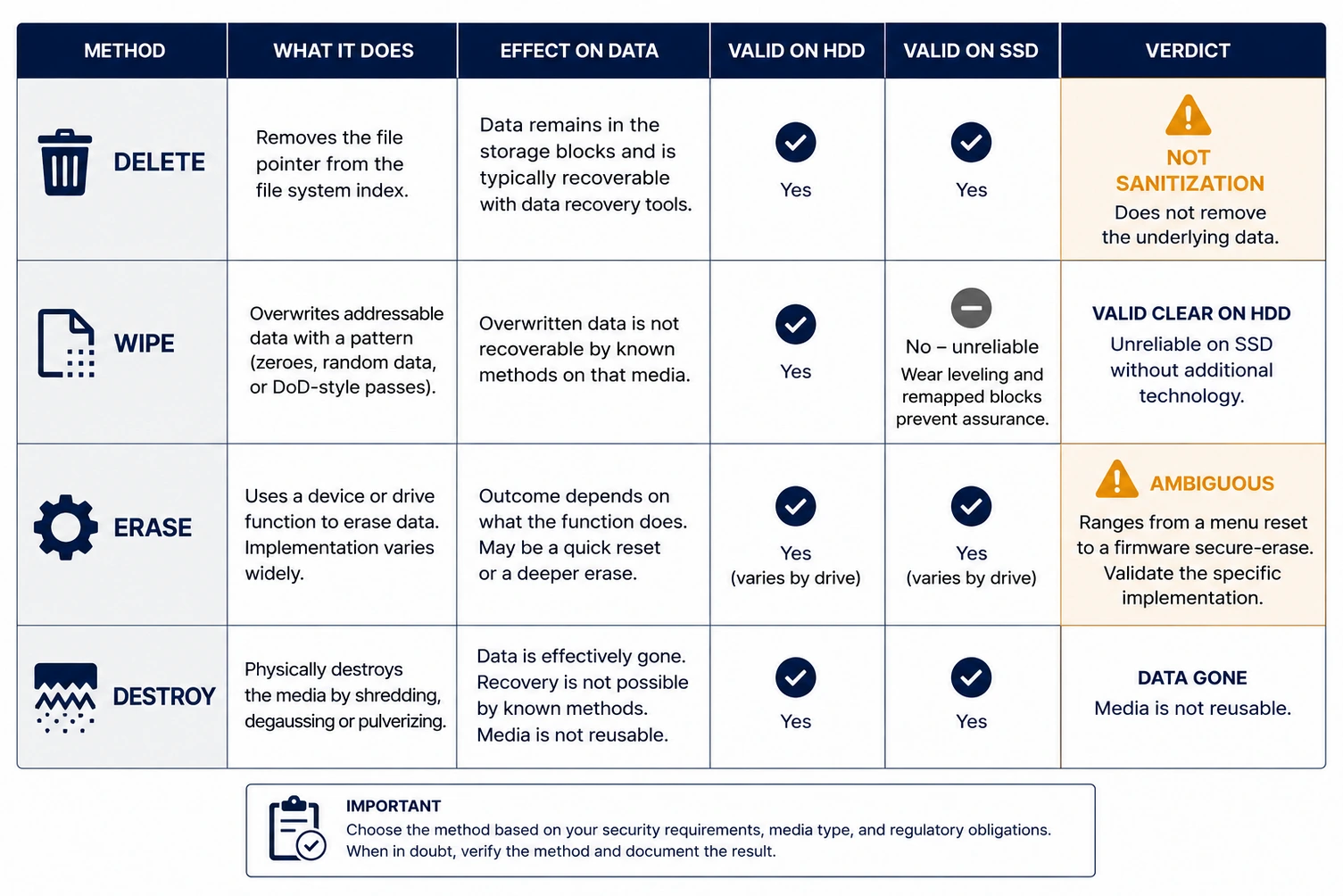
| Term | What actually happens | NIST 800-88 r2 outcome | Data recoverable afterward? |
|---|---|---|---|
| Delete | File system pointer removed, bits left in place | None | Yes, with basic tools |
| Erase | Ambiguous consumer term, often equals delete | None to Clear | Often yes |
| Wipe | Storage overwritten with new patterns | Clear | No on magnetic drives, unreliable on flash |
| Destroy | Media physically reduced to fragments | Destroy | No |
What does delete do?
Deleting a file marks its space as available and removes the index entry, but it does not touch the stored bits. The operating system stops showing the file, which creates a false sense of finality. Until new data overwrites that space, recovery software reconstructs the file in seconds, which is also why formatting does not erase data. Emptying the recycle bin changes nothing about the underlying data.
What do wipe and erase mean?
Wiping overwrites the addressable area of a drive with new data so the original content is replaced. On a magnetic hard drive this achieves the NIST Clear level, defined in the federal Guidelines for Media Sanitization, and leaves the drive reusable. The word erase is looser. Vendors apply it to everything from a quick delete to a full firmware routine, so the term alone tells you little about the outcome.
Overwriting has a hard limit. On solid state and flash media, wear leveling spreads writes across spare cells that a standard overwrite never addresses, so residual data can survive. For those devices the reliable reusable path is cryptographic erase, which destroys the encryption key so the ciphertext becomes unreadable. NIST treats cryptographic erase as a Purge technique, valid only when the drive was encrypted from first write and every copy of the key is destroyed.
What does destroy mean?
Destroying media physically ends its ability to hold data, the far end of the sanitization-versus-destruction spectrum. Shredding a hard drive into fragments, disintegrating a solid state drive, or degaussing a magnetic drive above its coercivity all move the device into a non-reusable end state. Physical destruction is the appropriate choice for the most sensitive data and for any medium that cannot be verified through overwriting, such as optical discs, which can only be destroyed.
Which method works on which media?
Reliability depends entirely on the medium, because each action interacts with the hardware differently. This table shows where each holds up.
| Media | Is wiping reliable? | Recommended action |
|---|---|---|
| Magnetic hard drive | Yes, achieves Clear | Wipe for reuse, or degauss and shred to retire |
| Solid state and flash | No, wear leveling defeats it | Cryptographic erase for reuse, or shred |
| Magnetic tape | Not applicable | Degauss above coercivity, or shred |
| Optical disc | Not applicable | Destroy only |
Which one should you use?
The choice is a judgment about assurance, not vocabulary. If the goal is to keep a magnetic drive in service and its data is low sensitivity, wiping to the Clear level is proportionate. If the drive is flash based, skip overwriting entirely, because it cannot be trusted to reach every cell; use cryptographic erase on an encrypted drive or destroy the device. And when the data is regulated, or the medium cannot be verified after the fact, destroy is the defensible endpoint. The safest reading of these four terms is the most conservative one: never assume delete or a vague erase did anything, and escalate to destroy whenever proof matters more than reuse.
Key points
- Delete and a vague erase leave data fully recoverable; neither is data destruction.
- Wiping achieves NIST Clear on magnetic drives but is unreliable on flash media.
- Cryptographic erase is the Purge-level path for reusable encrypted drives.
- Destroy is the endpoint for high-sensitivity data and for optical media that cannot be wiped.
Data Destruction Inc. removes the ambiguity by matching the right action to each medium and documenting the outcome: media is handled under tamper-evident chain of custody by trained, bonded, background-checked operators, and every project closes with a serialized Certificate of Destruction, provided within 24 hours after the destruction event is complete. To decide which method fits your retired equipment, call (866) 850-7977.
FAQ
Is wiping the same as deleting?
No. Deleting removes a pointer and leaves the data in place, while wiping overwrites the addressable storage so the original content is replaced. On a magnetic drive, wiping reaches the NIST Clear level; deleting does nothing to the underlying data.
Does wiping work on an SSD?
Not reliably. Wear leveling spreads data across spare cells that a host overwrite cannot reach, so residual data can survive. Use cryptographic erase on an encrypted SSD, or physically destroy the drive.
Is erase a technical term?
No. Erase is a marketing word applied to anything from a quick delete to a firmware routine. Because it has no fixed meaning, judge the action by what it actually does to the media, not by the label.
When is physical destruction necessary?
Destroy media when it held regulated or high-sensitivity data, when it cannot be verified through overwriting, or when it is optical media that cannot be wiped at all.
What is the safest default among these terms?
Treat destroy as the default whenever proof matters more than reuse. Delete and erase are the weakest, wiping is reliable only on magnetic media, and destroy removes the question of residual data entirely.
—