
What broken usually means
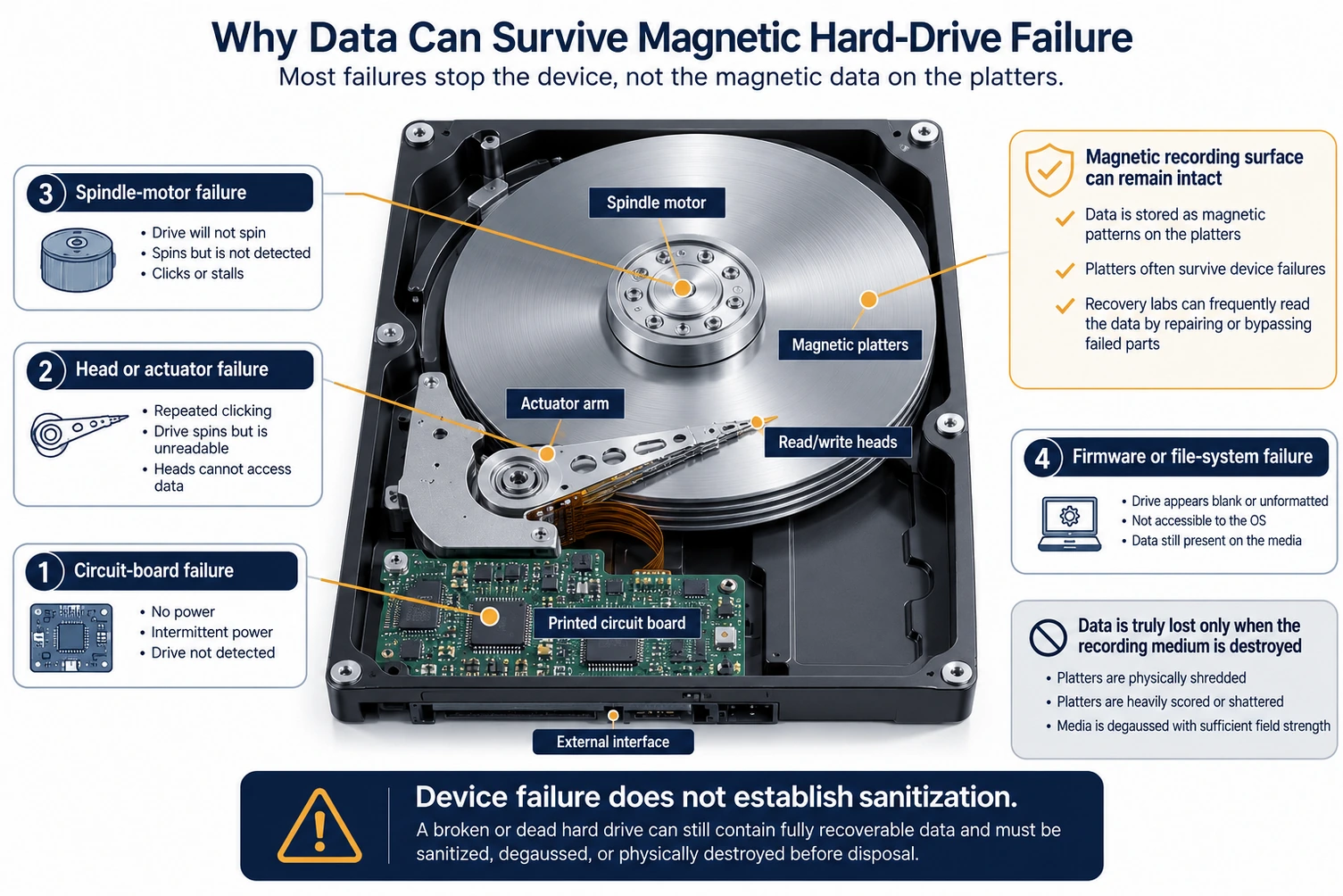
Most drive failures are not failures of the data itself. The data sits as magnetic patterns on the platters; everything else is the delivery mechanism. Common failures involve:
- The printed circuit board, the electronics that power and control the drive.
- The read/write heads or the arm that positions them, which cause clicking or a drive that spins but is not detected.
- The spindle motor that turns the platters.
- File system or firmware corruption that makes a healthy drive unreadable to the operating system.
In all of these, the platters and their data can be perfectly intact. The drive is broken as a device while remaining fully readable as a data source.
When the data survives
Data typically survives the failures people assume are fatal. A dead circuit board can be replaced or repaired so the platters spin again. Failed heads can be swapped in a cleanroom and the platters read. A drive that was dropped may have head or motor damage while the platter surfaces remain readable. Even water or minor fire exposure often leaves recoverable data once the drive is cleaned and stabilized. Professional recovery exists precisely because broken hardware rarely means erased data.
When the data does not survive
Data is genuinely lost when the platter surfaces themselves are destroyed or their magnetism is removed. That means deep scoring or shattering across the whole recording surface, degaussing with a field that exceeds the media’s coercivity, or shredding the platters into small particles. The pattern is consistent: recovery fails only when the recording medium is physically or magnetically ruined, not when the surrounding electronics or mechanics break.
Why this matters for disposal
The practical takeaway is that failed and end-of-life drives cannot be treated as harmless. A drive that will not boot still holds its data, and if it also cannot accept a sanitize command, overwrite and firmware erase are off the table, which leaves physical destruction as the reliable path. Tossing a dead drive in the trash or an untracked recycling bin exposes recoverable regulated data, exactly the scenario that turns a routine disposal into a breach. This content is informational and not legal advice; confirm your obligations with counsel.
The decision rule: if a drive holds regulated or sensitive data and has failed, destroy it (or degauss it if it is magnetic), because you cannot rely on a sanitize command a dead drive will not run.
Key points
- Most drive failures are in the electronics or mechanics, not the platters, so the data remains present.
- Labs recover data by replacing circuit boards, swapping heads, or stabilizing the drive.
- Data is only truly lost when the platter surface is destroyed, degaussed, or shredded.
- A dead drive that cannot run a sanitize command should be physically destroyed, not discarded.
Data Destruction Inc. treats failed drives as live data until proven otherwise: we degauss magnetic drives or shred media to a particle size matched to its density under sealed chain of custody handled by trained, bonded, background-checked operators, and you receive a serialized Certificate of Destruction, provided within 24 hours after the destruction event is complete. To retire a batch of dead or failed drives safely, call (866) 850-7977.
Related services: hard drive degaussing for magnetic drives and hard drive shredding for any failed media. Related reading: hard disk drive anatomy and data remanence explained. Compliance context is in our HIPAA media disposal guide, and financial services commonly retires failed drives at scale.
Authoritative standards: NIST SP 800-88 Rev. 2, Guidelines for Media Sanitization, and the NIST definition of Destroy.
FAQ
If my hard drive will not turn on, is the data gone?
Usually not. A drive that will not power on has typically failed in its circuit board, heads, or motor, while the platters that hold the data stay intact. A recovery lab can often repair or bypass the failed part and read the data.
Can data be recovered from a dropped or water-damaged drive?
Often, yes. A drop may damage the heads or motor while leaving the platter surfaces readable, and water damage is frequently recoverable once the drive is cleaned and stabilized. Physical shock does not reliably erase the recorded data.
When is data on a broken drive actually unrecoverable?
When the platter surfaces themselves are destroyed or demagnetized: shredded into small particles, scored or shattered across the whole surface, or degaussed by a field exceeding the media’s coercivity. Damage to the electronics or mechanics alone does not qualify.
Should I destroy a dead drive or try to wipe it?
If the drive will not power on it cannot run an overwrite or firmware sanitize, so those are not options. Physical destruction, or degaussing for a magnetic drive, is the reliable path for a failed drive holding sensitive data.
Is it safe to recycle or trash a drive that does not work?
No. A non-working drive still holds recoverable data, so discarding it exposes that data during handling. Destroy or degauss the drive first; recycling the remains is a separate step that never substitutes for destroying the data.
Does the same logic apply to a broken SSD?
A broken SSD can also retain data in its NAND chips even when the controller or interface fails, so it is not automatically safe either. Because flash cannot be degaussed, a failed SSD holding sensitive data should be destroyed to a small particle size. See our SSD architecture explainer.
—